Appearance
Appearance
Command and Control (C2) Frameworks are an essential part of both Red Teamers and Advanced Adversaries playbooks. They make it both easy to manage compromised devices during an engagement and often help aid in lateral movement.
What is a Command and Control Framework
While trying to digest the various components of a C2 framework, it may be intimidating. However, they don't have to be. In order to better understand what a C2 framework is at its most basic level, think of a Netcat listener (the C2 server) that is capable of handling many reverse shells calling back at once (C2 Agents). It's a server but for reverse shells. Unlike Netcat, almost all C2 frameworks require a special payload generator. This is usually a feature that is built into the framework itself. For example, Metasploit is a C2 Framework that has its own payload generator, MSFVenom.
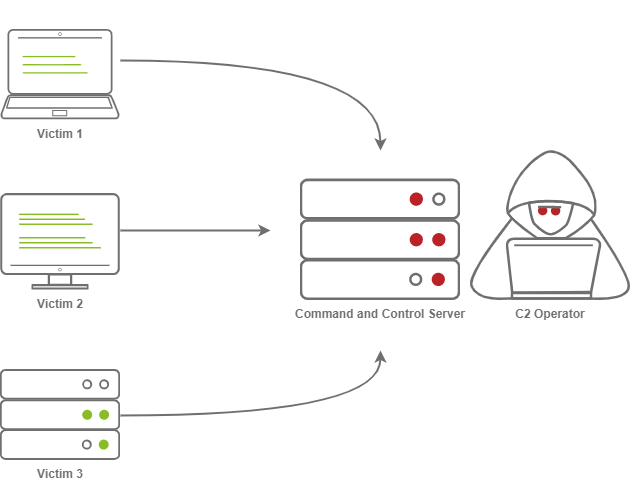
So what exactly makes C2 frameworks better than a normal Netcat listener? It seems like all someone needs to do is implement session management into Netcat, and you have the same thing? While this is true, C2 frameworks shine in their “Post Exploitation” features.
C2 Server
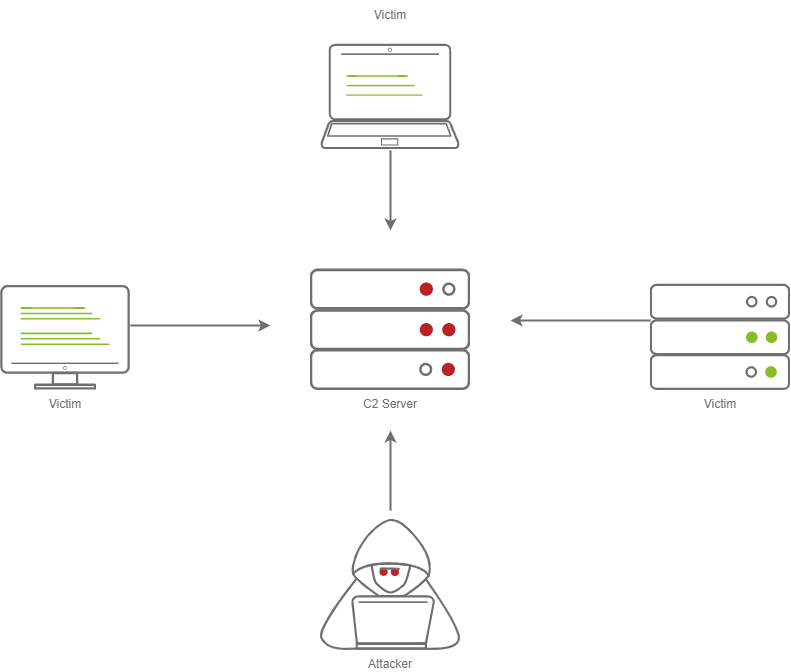
In order to understand a Command and Control framework, we must first start by understanding the various components of a C2 server. Let's start with the most essential component - The C2 Server itself. The C2 Server serves as a hub for agents to call back to. Agents will periodically reach out to the C2 server and wait for the operator's commands.
Agents / Payloads
An agent is a program generated by the C2 framework that calls back to a listener on a C2 server. Most of the time, this agent enables special functionality compared to a standard reverse shell. Most C2 Frameworks implement pseudo commands to make the C2 Operator's life easier. Some examples of this may be a pseudo command to Download or Upload a file onto the system. It's important to know that agents can be highly configurable, with adjustments on the timing of how often C2 Agents beacon out to a Listener on a C2 Server and much more.
Listeners
On the most basic level, a listener is an application running on the C2 server that waits for a callback over a specific port or protocol. Some examples of this are DNS, HTTP, and or HTTPS.
Beacons
A Beacon is the process of a C2 Agent calling back to the listener running on a C2 Server.
Sleep Timers
One key thing that some security analysts, anti-virus, and next-generation firewalls look for when attempting to identify Command and Control traffic is beaconing and the rate at which a device beacons out to a C2 server. Let's say a firewall observed traffic that looks like so
A pattern is starting to form. The agent beacons out every 5 seconds; this means that it has a sleep timer of 5 seconds.
Jitter
Jitter takes the sleep timer and adds some variation to it; our C2 beaconing may now exhibit a strange pattern that may show activity that is closer to an average user:
The beaconing is now set at a semi-irregular pattern that makes it slightly more difficult to identify among regular user traffic. In more advanced C2 frameworks, it may be possible to alter various other parameters, like “File” jitter or adding junk data to the payload or files being transmitted to make it seem larger than it actually is.
Sample Python3 code for Jitter may look like so:
import random
sleep = 60
jitter = random.randint(-30,30)
sleep = sleep + jitterIt's important to note that this is a fundamental example, but it can be much more math-heavy, setting upper bounds and lower bounds, taking percentages of last sleep, and building on from there. Because this is an introduction room, we will spare you a complicated formula.
Payload Types
Much like a regular Reverse Shell, there are two primary types of payloads that you may be able to use in your C2 Framework; Staged and Stageless payloads.
Stageless Payloads
Stageless Payloads are the simplest of the two; they contain the full C2 agent and will call back to the C2 server and begin beaconing immediately. You can refer to the diagram below to gain a better understanding of how Stageless payloads operate.
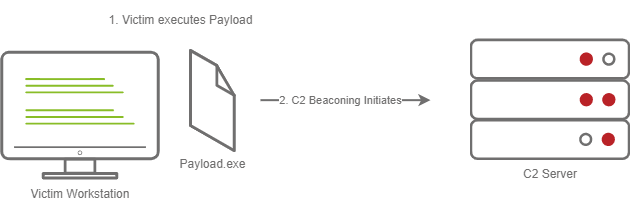
The steps for establishing C2 beaconing with a stageless payload are as follows:
Staged Payloads
Staged payloads require a callback to the C2 server to download additional parts of the C2 agent. This is commonly referred to as a “Dropper” because it is “Dropped” onto the victim machine to download the second stage of our staged payload. This is a preferred method over stageless payloads because a small amount of code needs to be written to retrieve the additional parts of the C2 agent from the C2 server. It also makes it easier to obfuscate code to bypass Anti-Virus programs.
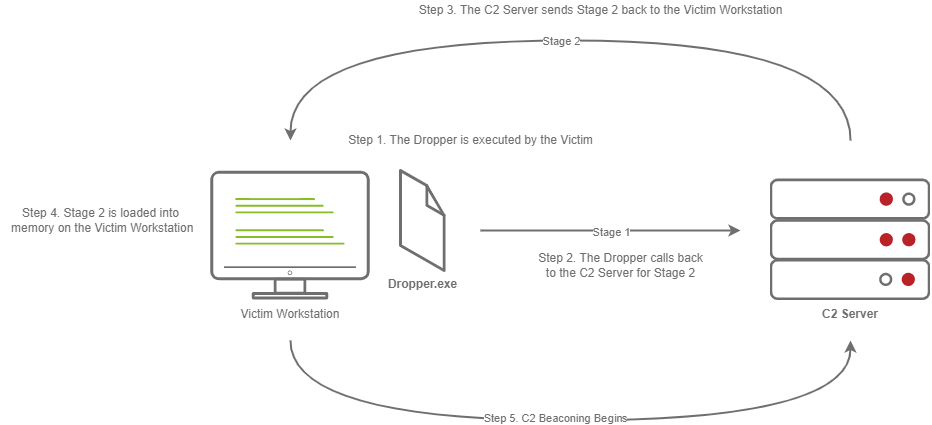
The steps for establishing C2 beaconing with a staged payload are as follows:
Payload Formats
As you may know, Windows PE files (Executables) are not the only way to execute code on a system. Some C2 Frameworks support payloads in various other formats, for example:
Modules are a core component of any C2 Framework; they add the ability to make agents and the C2 server more flexible. Depending on the C2 Framework, scripts must be written in different languages. Cobalt Strike has “Aggressor Scripts”, which are written in the “Aggressor Scripting Language”. PowerShell Empire has support for multiple languages, Metasploit's Modules are written in Ruby, and many others are written in many other languages.
Post Exploitation Modules
Post Exploitation modules are simply modules that deal with anything after the initial point of compromise, this could be as simple as running SharpHound.ps1 to find paths of lateral movement, or it could be as complex as dumping LSASS and parsing credentials in memory.
Pivoting Modules
One of the last major components of a C2 Framework is its pivoting modules, making it easier to access restricted network segments within the C2 Framework. If you have Administrative Access on a system, you may be able to open up an “SMB Beacon”, which can enable a machine to act as a proxy via the SMB protocol. This may allow machines in a restricted network segment to communicate with your C2 server.
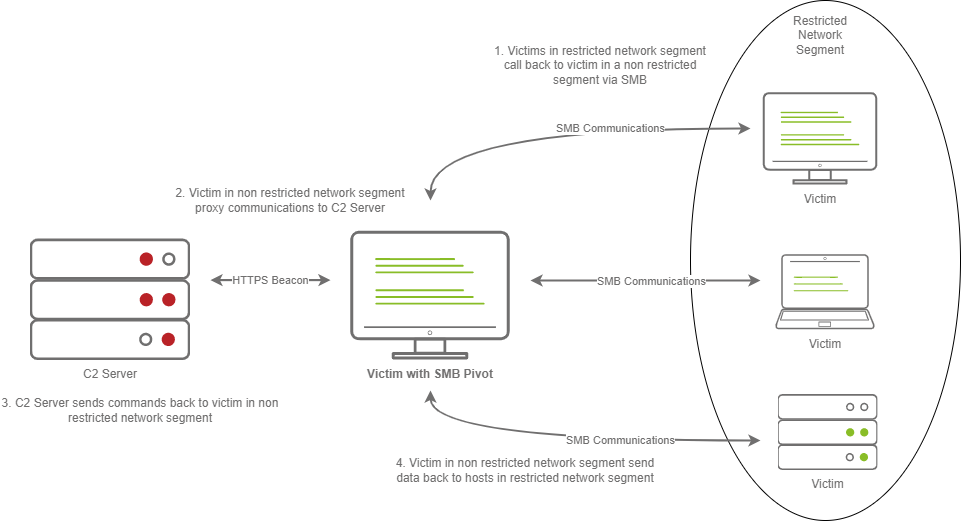
The diagram above shows how hosts within a restricted network segment call back to the C2 Server:
One important obstacle that all Red Teamers must overcome is placing infrastructure in plain view. There are many different methods to do this; one of the most popular methods is called "Domain Fronting".
Domain Fronting
Domain Fronting utilizes a known, good host (for example) Cloudflare. Cloudflare runs a business that provides enhanced metrics on HTTP connection details as well as caching HTTP connection requests to save bandwidth. Red Teamers can abuse this to make it appear that a workstation or server is communicating with a known, trusted IP Address. Geolocation results will show wherever the nearest Cloudflare server is, and the IP Address will show as ownership to Cloudflare.
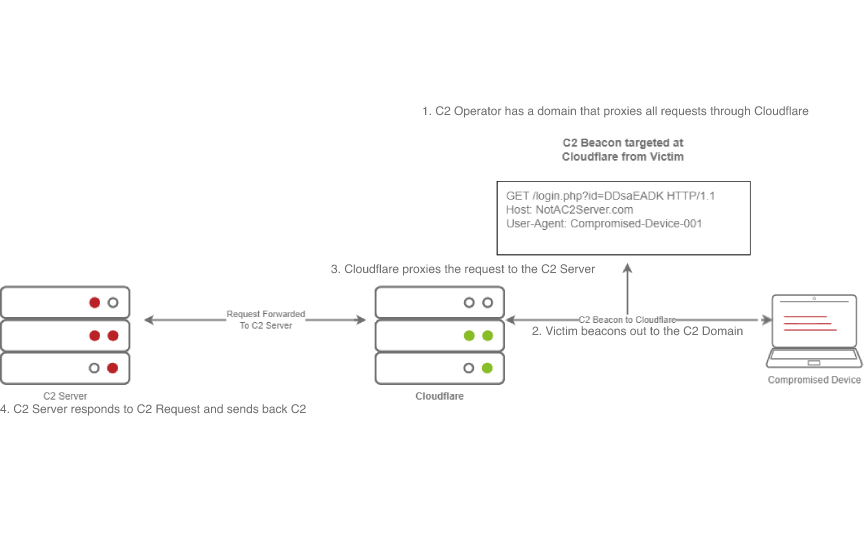
The diagram above depicts how Domain Fronting works:
C2 Profiles
The next technique goes by several names by several different products, "NGINX Reverse Proxy", "Apache Mod_Proxy/Mod_Rewrite", "Malleable HTTP C2 Profiles", and many others. However, they are all more or less the same. All of the Proxy features more or less allow a user to control specific elements of the incoming HTTP request. Let's say an incoming connection request has an "X-C2-Server" header; we could explicitly extract this header using the specific technology that is at your disposal (Reverse Proxy, Mod_Proxy/Rewrite, Malleable C2 Profile, etc.) and ensure that your C2 server responds with C2 based responses. Whereas if a normal user queried the HTTP Server, they might see a generic webpage. This is all dependent on your configuration.
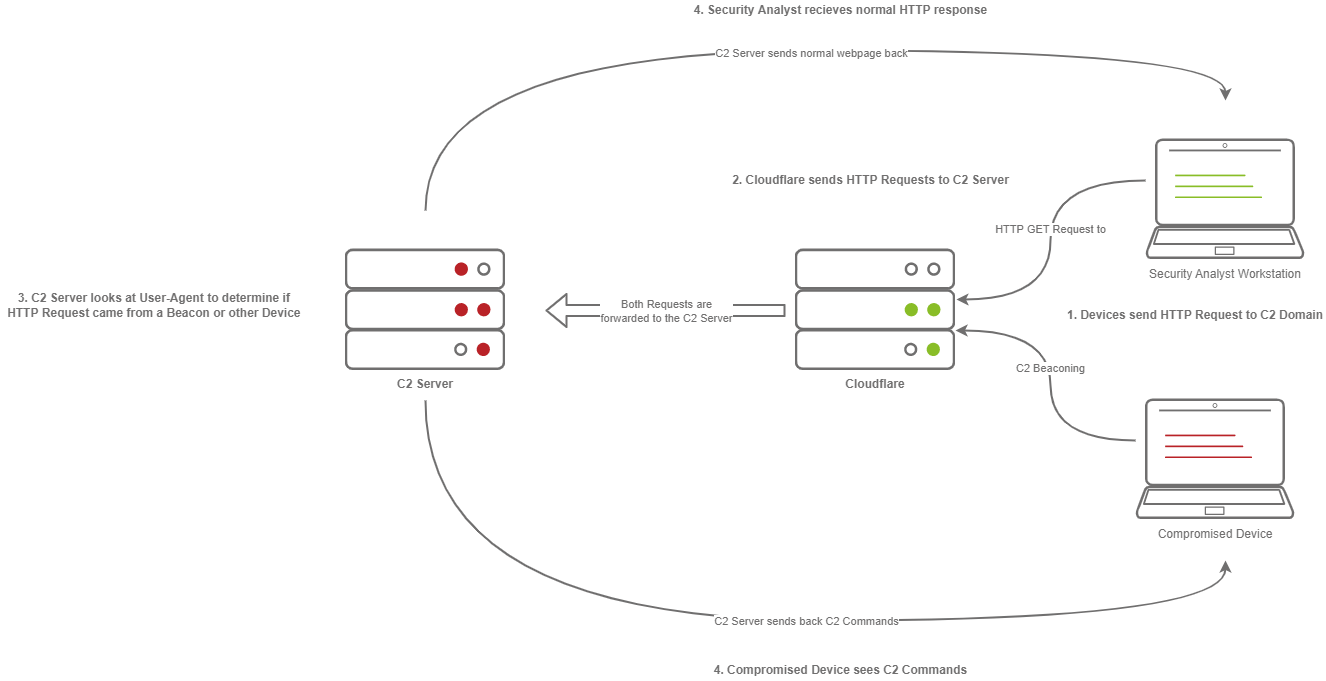
The diagram above depicts how C2 profiles work:
Because HTTPS requests are encrypted, extracting specific headers (ex: X-C2-Server, or Host) may be impossible. By using C2 Profiles, we may be able to hide our C2 server from the prying eyes of a Security Analyst. For more information on how C2 profiles can be powerful, see this blog post on Understanding Malleable C2 Profiles for Cobalt Strike.
Metasploit
The Metasploit Framework, developed and maintained by Rapid7, is one of the most popular Exploitation and Post Exploitation frameworks (C2) that is publicly available and is installed on most penetration testing distributions.
Armitage
Armitage is an extension of the Metasploit Framework - it adds a Graphical user interface and is written in Java, and is incredibly similar to Cobalt Strike. This is because they were both developed by Raphael Mudge. Armitage offers an easy way to enumerate and visualize all of your targets. Aside from looking a lot like Cobalt Strike, it even offers some unique features. One of the most popular can be found in the “Attacks” menu; This feature is known as the Hail Mary attack, which attempts to run all exploits for the services running on a specific workstation. Armitage really is “Fast and Easy Hacking”.
Powershell Empire/Starkiller
Powershell Empire and Starkiller is another incredibly popular C2 originally created by Harmjoy, Sixdub, and Enigma0x3 from Veris Group. Currently, the project has been discontinued and has been picked up by the BC Security team (Cx01N, Hubbl3, and _Vinnybod). Empire features agents written in various languages compatible with multiple platforms, making it an incredibly versatile C2.
Covenant
Covenant by Ryan Cobb is the last free C2 Framework we will be covering - By far, it is one of the most unique C2 Frameworks being written in C#. Unlike Metasploit/Armitage, It’s primarily used for post-exploitation and lateral movement with HTTP, HTTPS, and SMB listeners with highly customizable agents
Sliver
Sliver by Bishop Fox is an advanced, highly customizable multi-user, CLI-based C2 framework. Sliver is written in Go, which makes reverse engineering the C2 "implants" incredibly difficult. It supports various protocols for C2 communications like WireGuard, mTLS, HTTP(S), DNS, and much more. Additionally, it supports BOF files for additional functionality, DNS Canary Domains for masking C2 communications, automatic Let's Encrypt certificate generation for HTTPS beacons, and much more.
Cobalt Strike
Cobalt Strike by Help Systems (Formerly created by Raphael Mudge) is arguably one of the most famous Command and Control frameworks next to Metasploit. Much like Artimage, it is written in Java and designed to be as flexible as possible. For more information, see Cobalt Strike’s Video Training Page. It offers additional insight into both Red Team Operations and the Framework by Raphael Mudge himself.
Brute Ratel
Brute Ratel by Chetan Nayak or Paranoid Ninja is a Command and Control framework marketed as a “Customizable Command and Control Center” or “C4” framework that provides a true adversary simulation-like experience with being a unique C2 framework. For more information about the Framework, the author has provided a Video Training Page that demonstrates many of the capabilities within the framework.
For a more comprehensive list of C2 Frameworks and their capabilities, check out the "C2 Matrix", a project maintained by Jorge Orchilles and Bryson Bort. It has a far more comprehensive list of almost all C2 Frameworks that are currently available.
Downloading, Building, and Installing Armitage
git clone https://gitlab.com/kalilinux/packages/armitage.git && cd armitage

bash package.sh

cd ./release/unix/ && ls -laPreparing our Environment
#  initialize the database before launching Armitage.
systemctl start postgresql && systemctl status postgresql

# 将 MSF_DATABASE_CONFIG 环境变量设置为 Metasploit database.yml 文件的位置,在我们的例子中是 /root/.msf4/database.yml 。
export MSF_DATABASE_CONFIG=/root/.msf4/database.ymlStarting and Connecting to Armitage
cd /opt/armitage/release/unix && ./teamserver 10.10.152.208 P@ssw0rd123cd /opt/armitage/release/unix && ./armitageBasic Operational Security
You should never have your C2 management interface directly accessible. This is primarily for you to improve operational security. It can be incredibly easy to fingerprint C2 servers. For example, in versions prior to 3.13, Cobalt Strike C2 servers were able to be identified by an extra space (\x20) at the end of the HTTP Response. Using this tactic, many Blue Teamers could fingerprint all of the Cobalt Strike C2 servers publicly accessible. For more information on fingerprinting and identifying Cobalt Strike C2 Servers, check out this posted on the Recorded Future blog.
The point in mentioning this is that you want to reduce your operational security risk as much as possible. If this means not having the management interface for your C2 server publicly accessible, then, by all means, you should do it.
Accessing Your Remote C2 Server That's Listening Locally
This section will be focusing on how to securely access your C2 server by SSH port-forwarding; if you have port-forwarded with SSH before, feel free to skip over this section, you may not learn anything new. For those unfamiliar, SSH port-forwarding allows us to either host resources on a remote machine by forwarding a local port to the remote server, or allows us to access local resources on the remote machine we are connecting to. In some circumstances, this may be for circumventing Firewalls.

Or, in our instance, this could be done for operational security reasons.

Creating a Listener in Armitage
Getting a Callback
Listener Type
As previously mentioned, standard reverse shell listeners are not the only ones that exist; there are many varieties that use many different protocols; however, there are a few common ones that we will cover, these being the following:
Standard Listener
These often communicate directly over a raw TCP or UDP socket, sending commands in cleartext. Metasploit has full support for generic listeners.
HTTP/HTTPS Listeners
These often front as some sort of Web Server and use techniques like Domain Fronting or Malleable C2 profiles to mask a C2 server. When specifically communicating over HTTPS, it's less likely for communications to be blocked by an NGFW. Metasploit has full support for HTTP/HTTPS listeners.
DNS Listener
DNS Listeners are a popular technique specifically used in the exfiltration stage where additional infrastructure is normally required to be set up, or at the very least, a Domain Name must be purchased and registered, and a public NS server must be configured. It is possible to set up DNS C2 operations in Metasploit with the help of additional tools. For more information, see this "Meterpreter over DNS" presentation by Alexey Sintsov and Maxim Andreyanov. These are often very useful for bypassing Network Proxies.
SMB Listener
Communicating via SMB named pipes is a popular method of choice, especially when dealing with a restricted network; it often enables more flexible pivoting with multiple devices talking to each other and only one device reaching back out over a more common protocol like HTTP/HTTPS. Metasploit has support for Named Pipes.
As you may have guessed, Metasploit itself is not that great of a C2 server for advanced adversary operations. It's not as flexible as one would desire; you cannot configure agents to beacon out every X seconds with Y jitter. A Next-Generation Firewall could quickly pick up on this C2 traffic, seeing it's a constant stream of traffic. In addition, anyone could connect to an HTTP/HTTPS listener and find out relatively quickly what is going on.
Command and Control Redirectors
What is a Redirector?
Before we dive into configuring a Redirector, first, what is it? A Redirector is exactly as it sounds. It's a server that "Redirects" HTTP/HTTPS requests based on information within the HTTP Request body. In production systems, you may see a "Redirector" in the form of a Load Balancer. This server often runs Apache 2 or NGINX. For this lab, we will be leveraging Apache and some of its modules to build a Redirector.
Jumping back into Metasploit, we can set up some basic configurations on Metasploit to allow for more advanced configurations, in this task; we will be setting up a Redirector. Usually, this configuration is set up on multiple hosts; the purpose of this is to hide the true Command and Control server. The diagram below illustrates how communications between a victim and a C2 server happen.
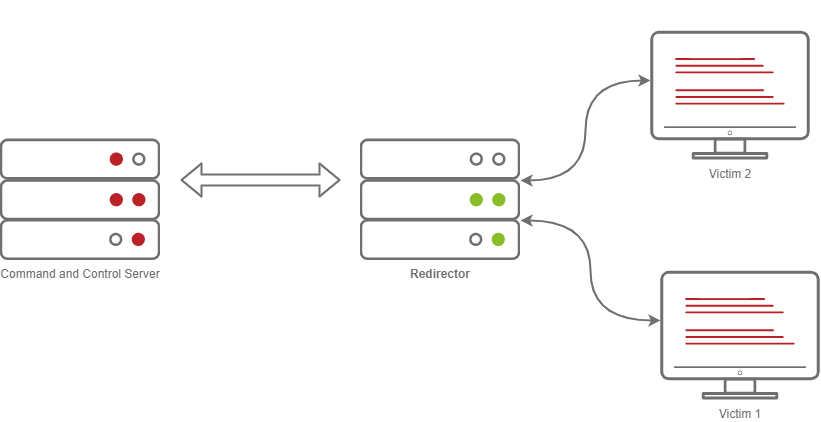
Usually, when you have a C2 callback, you may set the callback host to a Domain, let's say admin.tryhackme.com. It's very common for your C2 Server to get reported, when a user files a complaint. Usually, the server gets taken down fairly quickly. It can sometimes be as little as 3 hours and as much as 24.
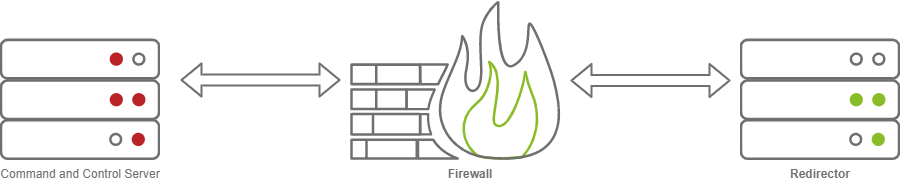
Setting up a redirector ensures that any information you may have collected during the engagement is safe and sound. But how does this stop the C2 Server from being taken down? Surely if someone fingerprinted Cobalt Strike on your C2 Server, someone would file a complaint, and it would get taken down. This is true, so you should set up a Firewall to only allow communication to and from your redirector(s) to mitigate any potential risks.